Business Clarity Article
Why Mobile Speed Matters to Your Customers
A customer should be able to find the answer, tap the next step, and keep moving.
Mobile speed is part of that experience. It affects how quickly useful content appears, how promptly the page responds, and whether the layout stays in place while someone uses it.
The Customer’s Experience
Can I see what I need?
Useful information appears promptly.
Did my tap work?
Menus and controls respond.
Will this stay put?
Text and buttons keep their place.
Illustrative customer questions—not a test result.
Everyday Situations
Three ways a mobile page can interrupt a customer.
These are illustrative situations, not measured customer outcomes. They show why performance deserves attention alongside the message and design.
Loading Delays
“I just need the repair number.”
A homeowner has a leaking pipe and opens a plumber’s service page. The important information is still waiting behind a large image or other page resources.
The customer needs to confirm the service, the area covered, and how to make contact. A faster route to those answers makes the page more useful at that moment.
Responsiveness
“I tapped the menu. Did it work?”
A homeowner comparing remodelers taps to open the service menu. Nothing visibly happens, so they tap again.
A page can look ready while still being slow to respond. The practical goal is clear, prompt feedback when someone opens a menu, selects an option, or uses a form control.
Visual Stability
“The button moved as I reached for it.”
A visitor starts to select a service. An image or banner loads above it and pushes the page down. The target moves beneath their finger.
Keeping space reserved for content helps the visitor read and act without repeatedly finding their place.
More Than the First Screen
A page needs to work after it appears.
A quick opening screen is useful, but the customer’s task continues. They may compare services, open a question, look through project photographs, or contact the business.
That is why we look at loading, responsiveness, and stability together. Google’s performance guidance treats them as separate aspects of the experience. Read the overview of the three core performance measures.
We also check the task itself: Is the right service easy to identify? Can the visitor find relevant proof? Is the contact method clear? Speed supports those decisions; the page still needs useful information worth reaching.
Clearly Labeled Demonstration
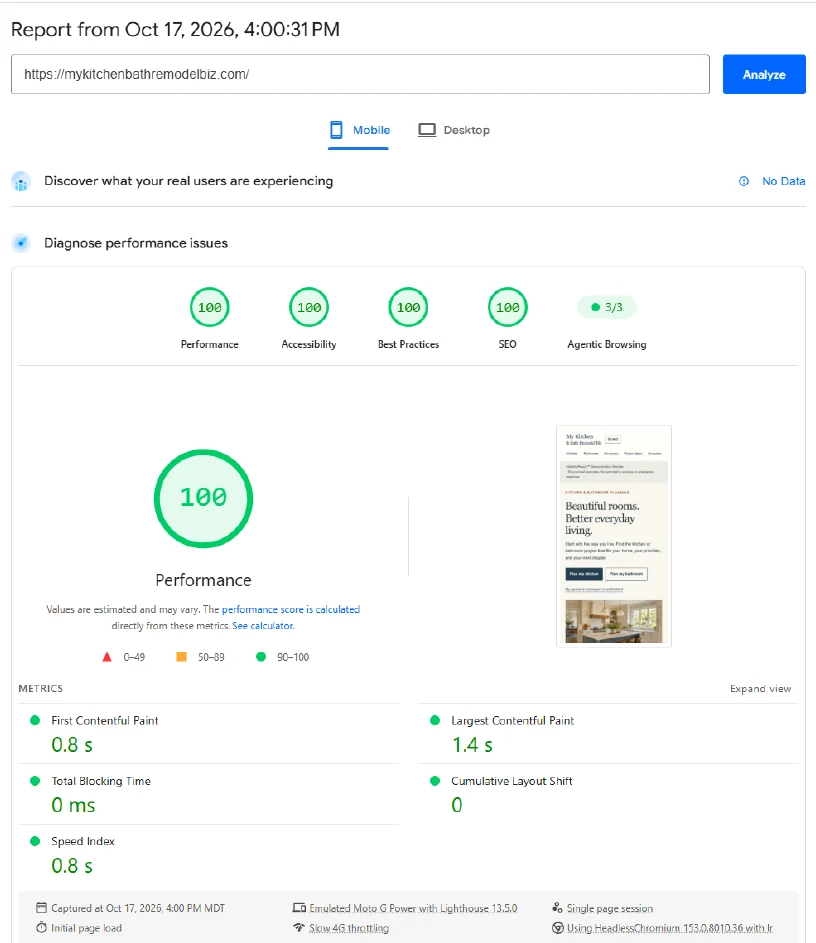
A real test of a demonstration website.
This example is the homepage of our kitchen-and-bath remodeling demonstration. It illustrates website design and customer decision paths. It does not provide remodeling services.
Mobile laboratory test recorded October 17, 2026, using PageSpeed Insights on the production domain.
| Category | Score |
|---|---|
| Performance | 100 / 100 |
| Accessibility | 100 / 100 |
| Best practices | 100 / 100 |
| Search engine optimization | 100 / 100 |
| Measurement | Recorded result |
|---|---|
| First visible content | 0.8 seconds |
| Largest visible content element | 1.4 seconds |
| Total blocking time | 0 milliseconds |
| Cumulative layout shift | 0 |
The report names the first two measurements First Contentful Paint and Largest Contentful Paint. They describe rendering milestones, rather than the time required for every part of the page to finish loading.
What this example tells us
The recorded run shows strong automated results and useful content appearing quickly under the test conditions.
The report had no real-user data. Real-user validation was pending. Its zero blocking-time result is a laboratory measure; it does not establish responsiveness across real customer visits. The scores also do not establish rankings, inquiries, or sales.
The Balanced Approach
Speed helps people use the business information you have made clear.
An established service business needs more than an attractive screen. It needs accurate services, appropriate customer paths, relevant proof, and an experience that makes those pieces easy to use.
VisibilityReady™ considers mobile performance as part of the larger business picture. Improvements should preserve useful photographs, explanations, and proof while removing unnecessary friction.
See how clear business information supports understanding in artificial intelligence answers.
Questions Business Owners Ask
What should you take from a mobile speed report?
Does a fast website automatically rank higher in Google?
No. Google uses core performance measures within its ranking systems, but its guidance also emphasizes relevance and the overall page experience. A strong score does not guarantee a top position.
Use performance work to improve verified problems on important customer pages. Google also cautions that chasing a perfect score purely for search reasons may be a poor use of time. Read Google’s page-experience guidance.
What do the three core performance measures mean?
They describe how quickly the largest visible content element appears, how promptly the page shows a response to an interaction, and how much the layout unexpectedly shifts.
| Measure | Recommended threshold |
|---|---|
| Largest Contentful Paint | 2.5 seconds or less |
| Interaction to Next Paint | 200 milliseconds or less |
| Cumulative Layout Shift | 0.1 or less |
Google assesses these thresholds at the 75th percentile of real visits, separating mobile and desktop. See the official definitions and assessment guidance.
Why can a site look loaded but still respond slowly?
The browser may still be busy with scripts or other work when someone interacts. A menu or control can be visible before the page can promptly show the response to a tap.
Interaction to Next Paint measures responsiveness through the next visual update. It does not measure the entire time needed to complete a network request or a business transaction. Read the explanation of responsiveness.
What if the report shows no real-user data?
You can still use the laboratory test to investigate loading and layout problems. It is one set of controlled observations, while actual visitors use different devices, connections, and interaction paths.
Keep real-user validation pending until sufficient evidence is available. Compare repeat tests under similar conditions and check important tasks on a phone. Missing real-user data alone is not a failed result.
The Practical Next Step
Make the customer’s next step easier.
If a visitor needs to find a service, compare options, or contact your business, the website should help them do that with as little unnecessary effort as possible.
A VisibilityReady™ Review looks at the website in the context of the actual business: what is clear, what earns trust, what should be preserved, and where the customer experience needs improvement.
Sources and further reading
Official guidance checked October 19, 2026. Demonstration measurements come from the October 17 report supplied by Mark Paterson.